Olist Data Analysis
Building a structured environment to extract business performance insights from 100k+ records.
Project Overview
This project explores the Olist dataset (the largest department store in Brazilian marketplaces)
to uncover hidden patterns in sales performance, customer geography,
and product profitability.
Facing a dataset of almost 100,000 orders spanning multiple tables and relationships,
the goal was to build a scalable relational structure and extract high-level KPIs to drive executive decision-making.
Executive Overview
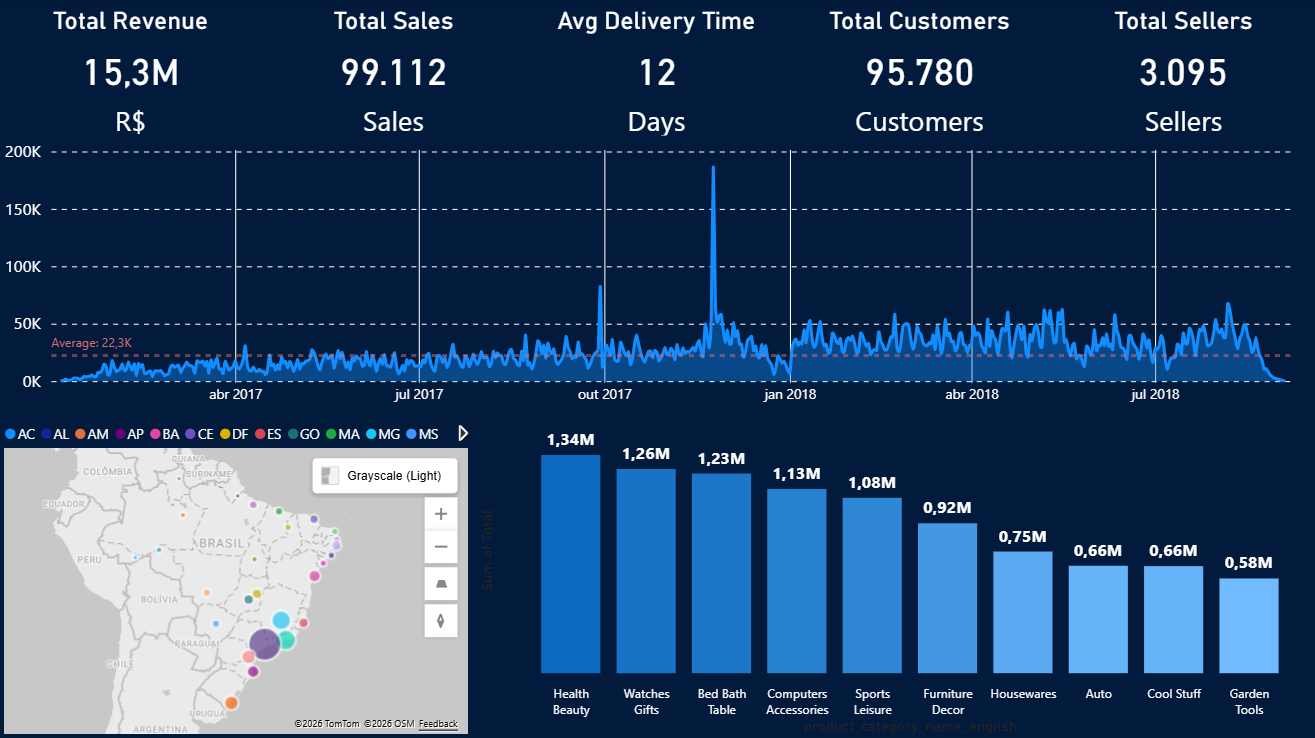
This panel provides a granular day-to-day view of the marketplace operation,
highlighting daily volatility in sales and logistics.
Beyond temporal trends, it integrates geospatial distribution to identify regional
clusters and a categorical breakdown to pinpoint the top-performing product niches.
All metrics summarize 100k+ records through optimized SQL
(detailed here).
Core Technologies
- PostgreSQL: Advanced query optimization, CTEs, and Window Functions.
- Relational Database Design: Data Polishing and Normalization with Entity-Relationship modeling.
- Power BI & CSV Analytics: Data visualization with Business Intelligence & Storytelling.
The Challenge
Re-establishing a database structure within PostgreSQL and transforming it
into structured environment capable of answering
complex business questions.
Such as:
- How is the business performing over time?
- Which categories have the highest product prices?
- Which product categories contribute most to total profit?
- How are the categories distributed in percentage?
- Where are the best places for distribution centers?
- How does customer distribution vary across regions?
Strategic Architecture
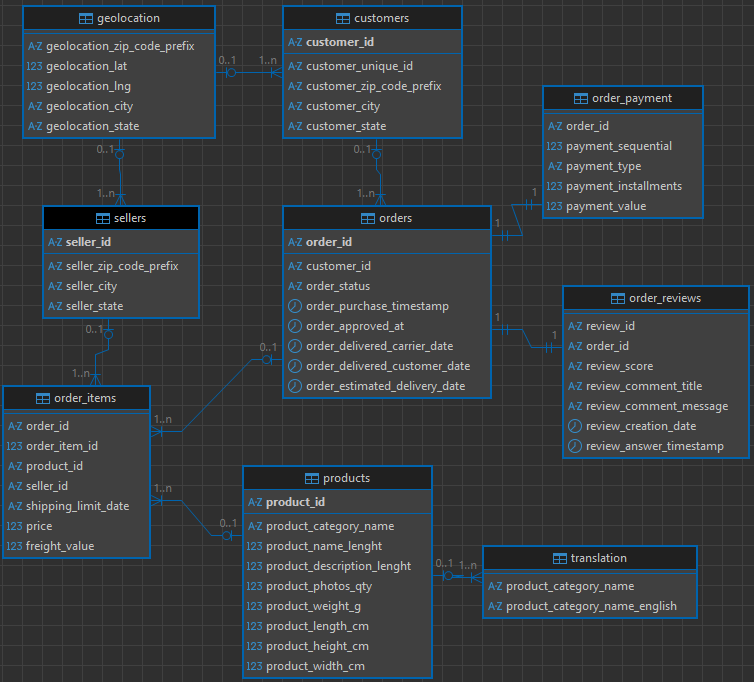
Everything should start with a solid foundation, as such, the first step was mapping the entity relationships
to ensure that every join across the 100k+ orders remained accurate and efficient.
Below is the normalized database schema designed to ensure data integrity and optimized retrieval.
Entity Relationship Diagram
Queries
-
Query 1 - How is the business performing over time?
Description:
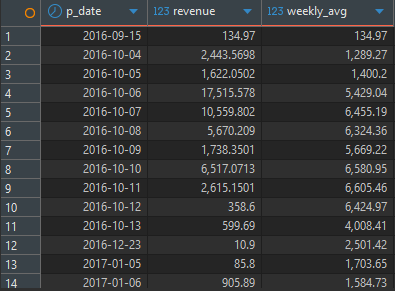
Calculates daily revenue and computes a weekly average.
SQL Code:
With daily_revenue as (
    SELECT SUM(oi.price) AS revenue,
        o.order_approved_at::date AS p_date
    FROM orders o
        JOIN order_items oi ON o.order_id = oi.order_id
    GROUP BY p_date
    )

SELECT p_date, revenue,
    ROUND(AVG(revenue) OVER
    (ORDER BY p_date ROWS BETWEEN 6 PRECEDING AND CURRENT ROW)::numeric, 2) AS weekly_avg
FROM daily_revenue;
Results:
Note: Profit calculations are based on available dataset attributes and do not include operational costs beyond freight.
Insight:
Analyzing the weekly moving average allows for smoothing out daily fluctuations and identifying the true growth or decline trends in sales by eliminating noise from isolated peaks.
Business Value:
It assists the planning team in forecasting inventory and staffing needs based on medium-term trends rather than just the previous day's performance.
Visualization:
The following graph illustrates the monthly revenue, helping to identify historical patterns and business evolution.
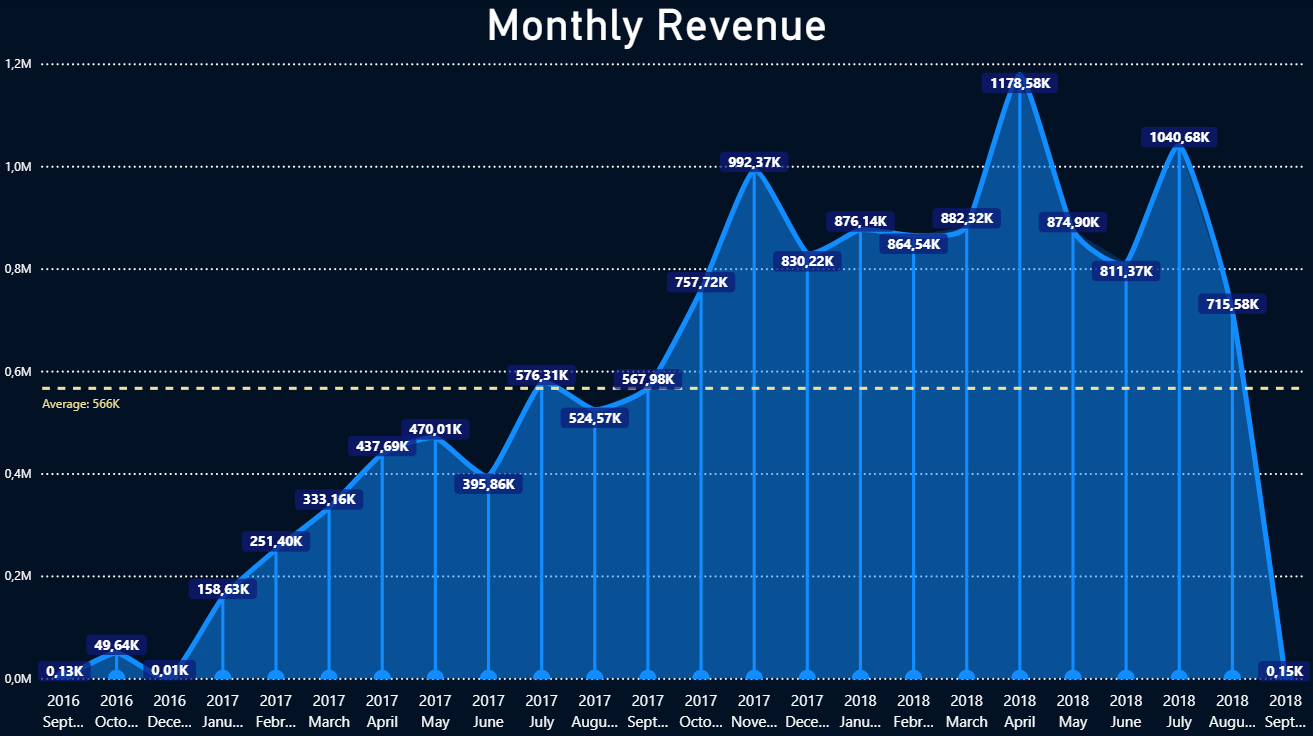
Graph made with CSV created from the query results.
-
Query 2 - Which categories have the highest product prices?
Description:
Ranks products within each category based on their prices.
SQL Code:
SELECT DISTINCT t.product_category_name_english AS Category,
    oi.price AS Price,
    DENSE_RANK() OVER (PARTITION BY p.product_category_name ORDER BY oi.price DESC) AS Ranking
FROM products p
    JOIN order_items oi ON p.product_id = oi.product_id
    JOIN "translation" t ON p.product_category_name = t.product_category_name
ORDER BY oi.price DESC, ranking ASC, t.product_category_name_english;
Results:
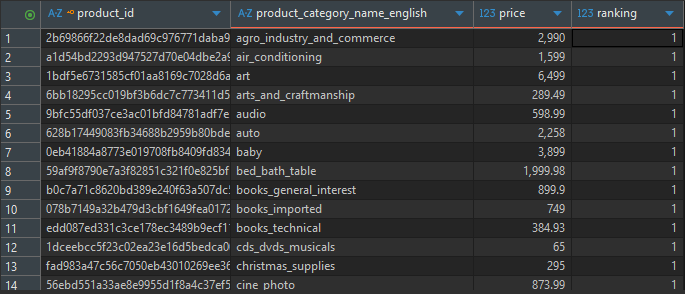
Insight:
By using DENSE_RANK, it is possible to identify "premium" (high-end) products within each segment without skipping positions in the classification.
Business Value:
Enables the marketing team to create targeted campaigns for "Luxury/Premium" audiences within specific categories.
Visualization:
The following graph illustrates categories that have pricier products.
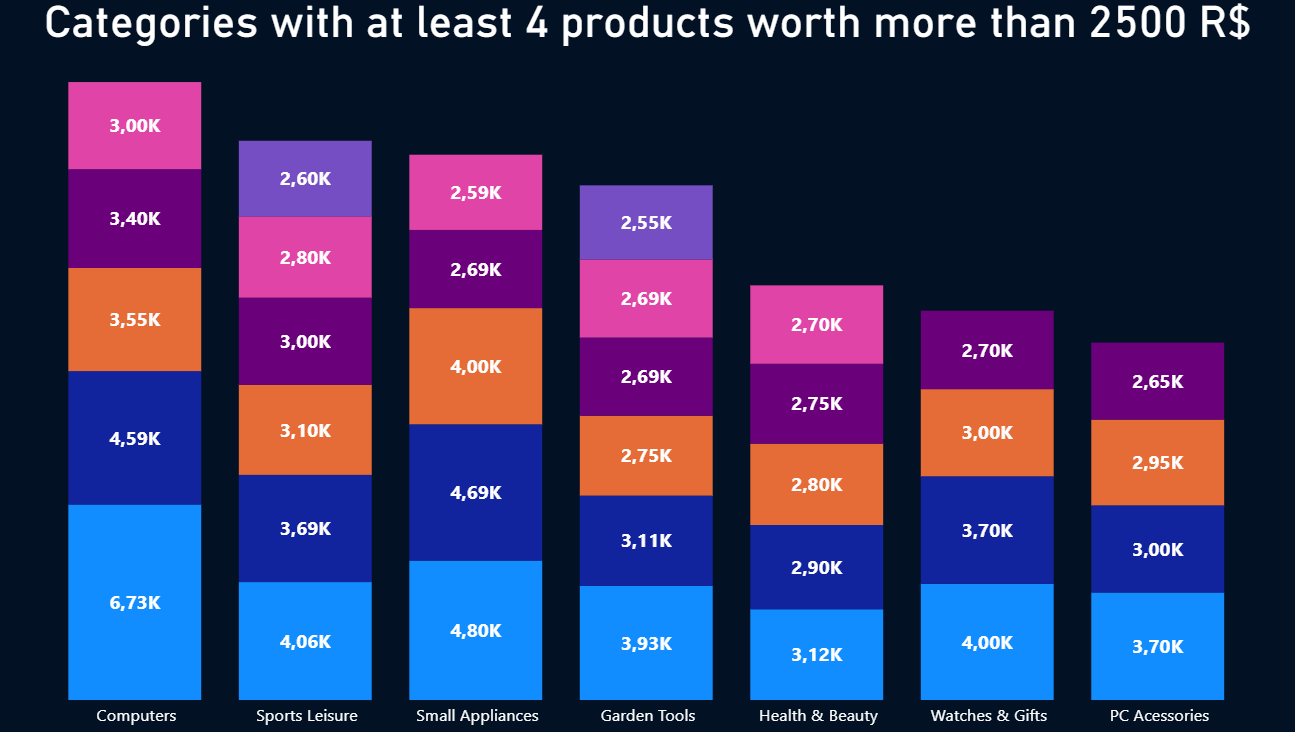
Graph made with CSV created from the query results.
-
Query 3 - Which product categories contribute most to total profit?
Description:
Retrieves the top 5 product categories that have generated the highest total profit.
SQL Code:
SELECT t.product_category_name_english AS category,
    ROUND(SUM(oi.price * oi.order_item_id)) AS income
FROM products p
    JOIN order_items oi ON p.product_id = oi.product_id
    JOIN translation t ON p.product_category_name = t.product_category_name
GROUP BY t.product_category_name_english
ORDER BY income DESC
LIMIT 5;
Results:
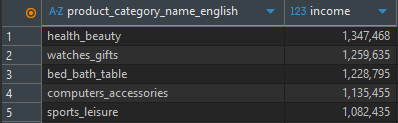
Insight:
Identifies the primary revenue drivers for the company. Categories such as Health & Beauty and Watches & Gifts emerge as leaders, accounting for a significant portion of total profit.
Business Value:
Directs investment in advertising and partnerships toward the categories that yield the highest direct return on investment (ROI).
Visualization:
The following graph illustrates the top 5 most profitable categories.
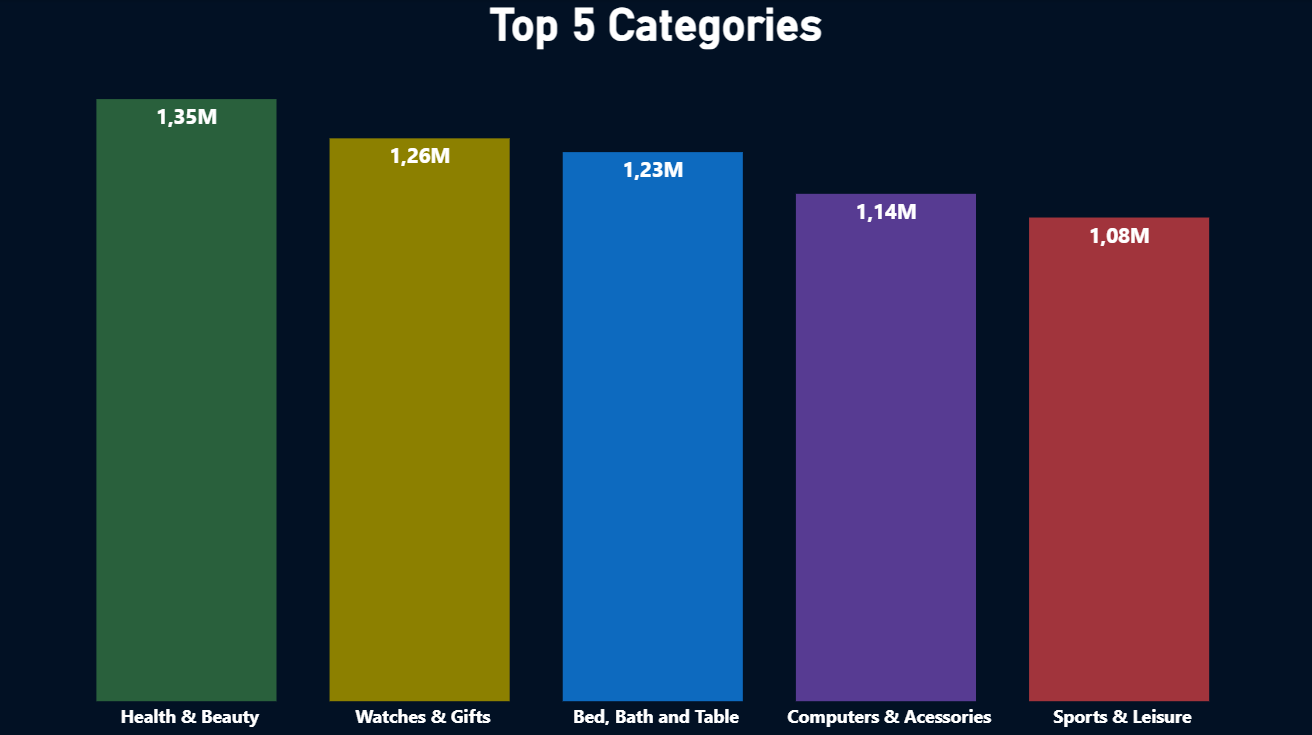
Graph made with CSV created from the query results.
-
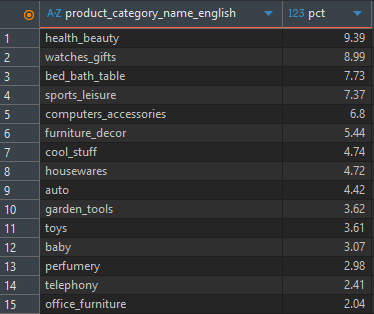
Query 4 - How are the categories distributed in percentage?
Description:
Calculates the percentage contribution of each product category to the total income.
SQL Code:
WITH income_pct AS (
SELECT t.product_category_name_english AS category,
    ROUND(((SUM(oi.price) / SUM(SUM(oi.price)) OVER())::NUMERIC * 100),2) AS pct
FROM order_items oi
    JOIN products p ON oi.product_id = p.product_id
    JOIN "translation" t ON p.product_category_name = t.product_category_name
GROUP BY t.product_category_name_english)

SELECT * FROM income_pct
WHERE pct > 0
ORDER BY pct DESC;
Results:
Insight:
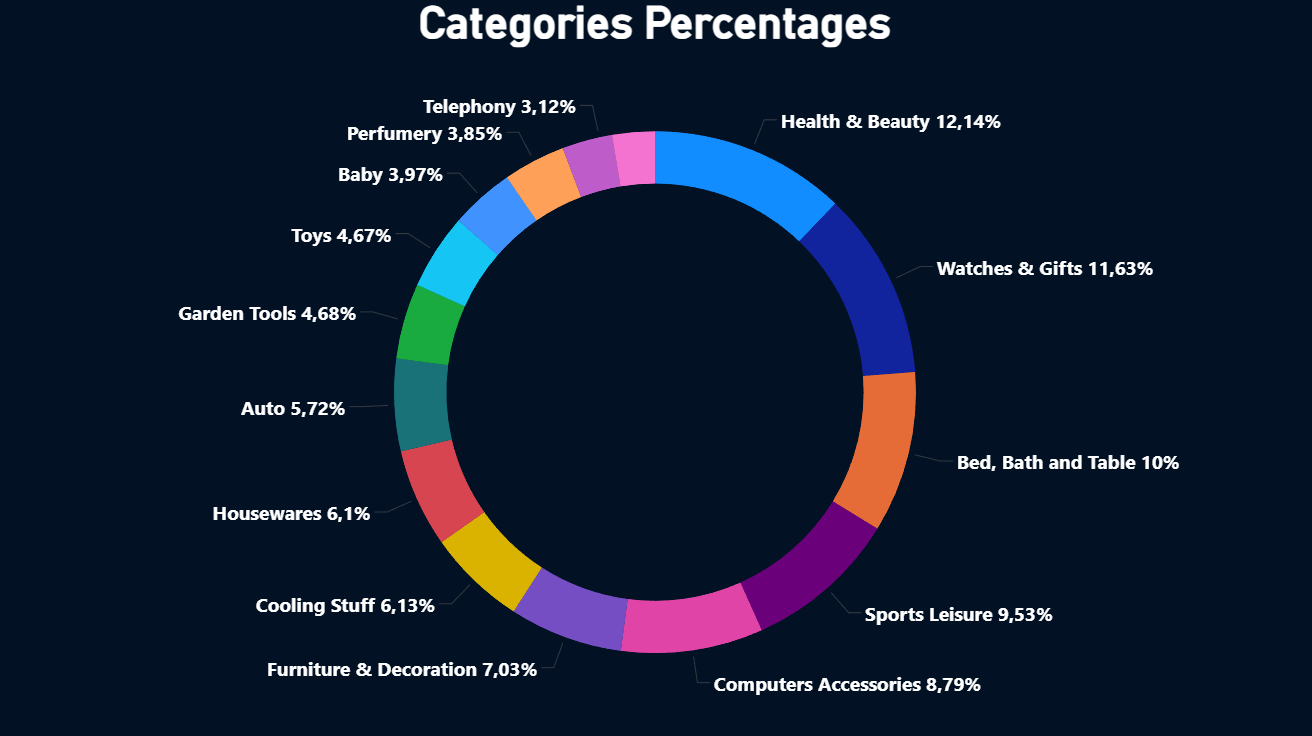
This Pareto-style analysis reveals that the top categories represent a disproportionate percentage of total income, often following the 80/20 rule where a small group of products generates most of the revenue.
Business Value:
Critical for merchandising decisions and inventory management, as it highlights which categories to prioritize, it is also helpful for understanding the company's dependency on specific market niches.
Visualization:
The following graph illustrates the percentage of total income contributed by each product category.
Graph made with CSV created from the query results.
-
Query 5 - Where are the best places for distribution centers?
Description:
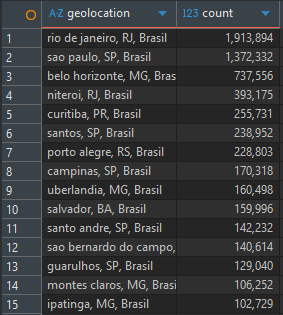
Ranks cities based on the number of customers in each city.
SQL Code:
SELECT g.geolocation_city || ',' || g.geolocation_state || ',' || 'Brasil' AS geolocation,
    COUNT(c.customer_city)
FROM customers c
    JOIN geolocation g ON c.customer_zip_code_prefix = g.geolocation_zip_code_prefix
GROUP BY g.geolocation_city ,g.geolocation_state
ORDER BY COUNT(c.customer_city) DESC;
Results:
Insight:
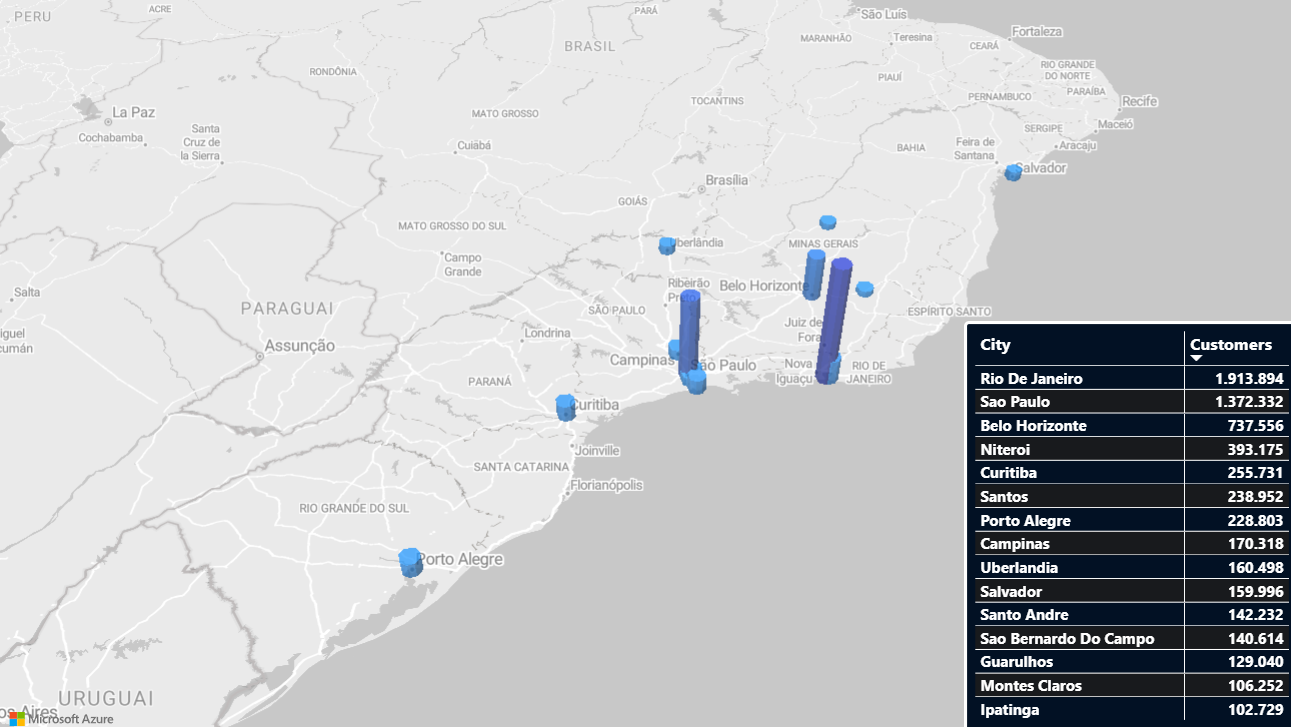
Customer volume is heavily concentrated in major hubs like Rio de Janeiro, São Paulo, and Belo Horizonte. As such, these cities are ideal locations for distribution centers.
Business Value:
Guides logistics strategies, such as establishing distribution centers (hubs) near these clusters to reduce delivery times and shipping costs (freight).
Visualization:
The following map shows the 15 cities with the highest customer counts.
Graph made with CSV created from the query results.
-
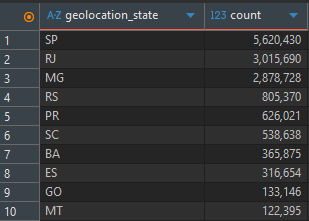
Query 6 - How does customer distribution vary across regions?
Description:
Ranks Brazilian states based on the number of customers in each state.
SQL Code:
SELECT g.geolocation_state,
    COUNT(c.customer_state)
FROM customers c
    JOIN geolocation g on c.customer_zip_code_prefix = g.geolocation_zip_code_prefix
GROUP BY g.geolocation_state
ORDER BY COUNT(c.customer_state) DESC;
Results:
Insight:
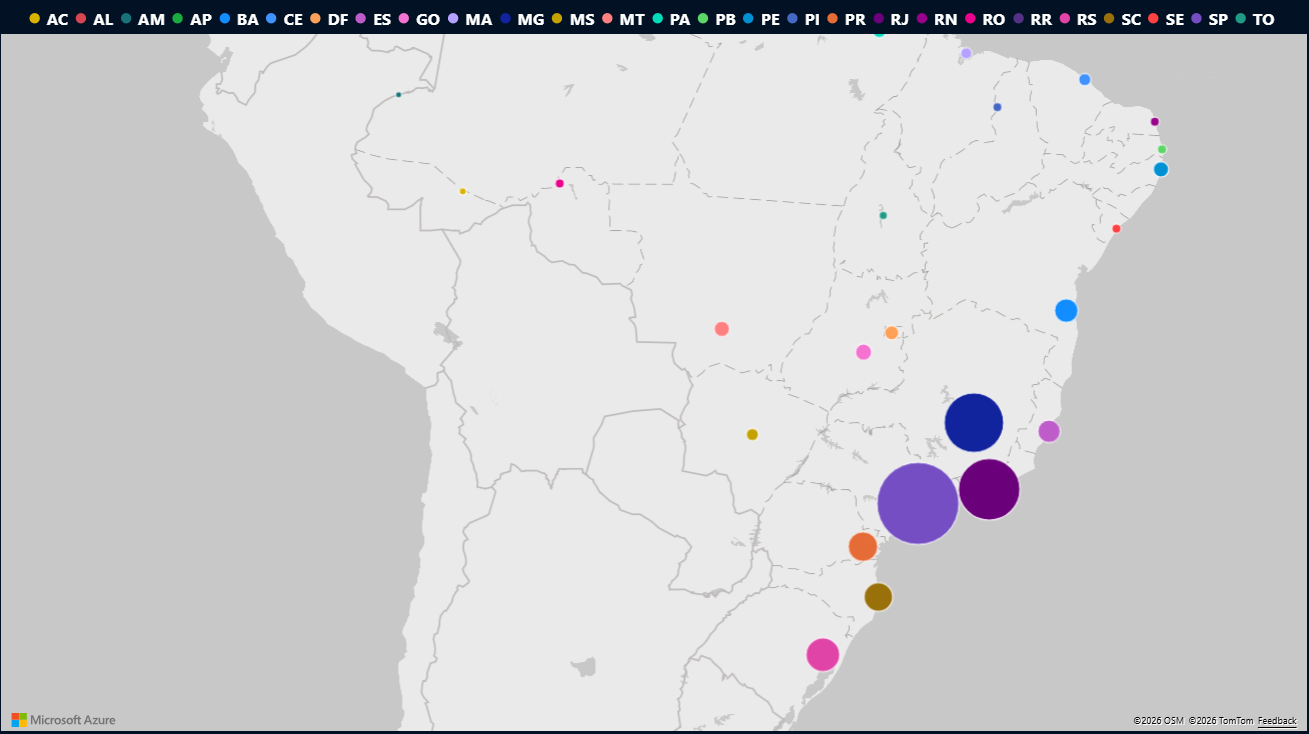
The state of São Paulo (SP) leads by a significant margin, followed by RJ and MG, solidifying the Southeast region as the primary consumer market.
Business Value:
Allows for personalized regional promotions and provides insights into brand penetration in states with lower customer representation, such as MT and GO, where there is growth potential.
Visualization:
The following map illustrates the customer distribution across Brazilian states.
Graph made with CSV created from the query results.
Key Strategic Takeaways
- Revenue growth shows sustained trend despite daily volatility
- Health & Beauty and Watches & Gifts concentrate a disproportionate share of profit
- Customer density strongly favors Southeast region, reinforcing logistics hub prioritization
- Pareto distribution confirms dependency on top-performing categories